1. Why Formatting & Big Text Matter in Modern Discord Communities
Discord has evolved far beyond a simple voice chat app for PC gamers. In 2026, millions of community hubs, Web3 DAOs, esports teams, university study groups, and commercial software support servers rely on Discord as their primary digital headquarters. In an active guild with dozens of channels and thousands of messages flowing through the feed every hour, standard 14px chat text blends into a wall of unreadable chatter.
Whether you are an administrator broadcasting a mandatory server rules update, an event organizer scheduling an esports tournament bracket, a guild leader rallying your squad, or a community moderator pinning a critical patch note, you need your typography to command immediate visual hierarchy. Text size and visual contrast dictate what users read first and what they ignore.
Fortunately, Discord offers multiple distinct mechanisms to enlarge and amplify your typography: Native Markdown Headers (introduced to bring desktop-class heading hierarchy to chat), Subtext formatting for muted disclaimers, Monospace Code Blocks for multi-line block art, and universal Unicode Mathematical Typography generated with our free Big Text Generator. In this exhaustive 2026 handbook, we examine every technique, troubleshoot common rendering bugs, and show you exactly where each styling method works across desktop, mobile, and browser clients.
1. Biggest Chat Header: Type # Your Text at the start of any line.
2. Medium Subheading: Type ## Your Text at the start of a line.
3. Channel Names & Nicknames: Generate bold glyphs via Big Text Generator (Markdown does not work in channels).
4. Giant Banner Art: Wrap multi-line ASCII block art inside triple backticks ```.
2. Native Discord Markdown Headings: Deep Dive into #, ##, and ###
Discord chat messages natively parse a specialized flavor of Markdown based on the CommonMark Specification as detailed in the official Discord Markdown Text 101 Guide. Headings allow administrators and users to construct clean, publication-grade announcements without relying on bot embeds.
Discord supports three distinct heading levels, each initiated by one, two, or three hashtag symbols (#) placed at the very beginning of a line. Each level renders with distinct font size, line height, and bold typographic weight across both desktop and mobile apps:

- Header 1 (
#): The largest native text possible in standard Discord chat. Renders at approximately 32px font size with maximum bold weight. Use Header 1 exclusively for primary titles, breaking news alerts, server launch banners, and main announcement headings. - Header 2 (
##): A secondary tier rendering at approximately 24px font size. Ideal for dividing long announcements into thematic sections, separating tournament phases, or categorizing server rule books. - Header 3 (
###): A tertiary tier rendering at approximately 18px font size with medium-bold styling. Perfect for subsection headers, step numbers in multi-step tutorials, or individual role perk overviews.
# 🏆 ANNUAL GUILD CHAMPIONSHIP 2026
## Phase 1: Qualifier Round Details
### Match Rules & Code of Conduct
All players must check in 15 minutes before match start.The single most frequent mistake users make is typing #Heading without a space. Discord strictly requires an empty space immediately following the hashtag (# Heading). If you omit the space, Discord interprets your text as a hashtag tag or channel mention and renders it in plain, unformatted text!
3. Small Subtext Formatting: The Negative Heading (-#)
Along with large headers, Discord introduced a complementary typographic tier known in the community as the "subtext" or "negative heading" operator: -# (a hyphen followed by a hashtag and a space).
While `#` dramatically magnifies font size, -# scales font size down to approximately 11px to 12px and tints the text with a soft, muted gray opacity. This introduces visual rhythm and professional information hierarchy into chat channels. Instead of shouting every detail in all-caps, seasoned community managers pair a monumental `# Header 1` with a discreet -# Subtext line directly underneath.
Subtext is extraordinarily versatile for appending timestamps, legal disclaimers, author signatures, reaction instructions, and fine print:
# ⚡ DISCORD NITRO GIVEAWAY
React with 🎉 below within 24 hours to enter the raffle!
-# Terms: Must be a verified server member for at least 7 days. Bot accounts will be disqualified.You can nest standard markdown inside subtext! For example, -# Posted by **Moderation Team** • Read our [full rules](https://discord.com) renders bold text and hyperlinks within the miniature gray footer.
4. Combining Headers with Bold, Italics, and Strikethrough for Maximum Impact
A lesser-known trick among casual Discord users is that Markdown heading operators can be nested with standard character formatting tags. While `# Header 1` already applies bold weight, wrapping the heading text inside additional Markdown tags creates even stronger visual separation:
- Extra-Heavy Bold Heading:
# **MASSIVE BOLD TITLE**— Enforces maximum contrast and weight across dark mode themes. - Italicized Header:
# *Aesthetic Server Vision*or# ***Bold Italic Title***— Imparts an elegant, editorial feel for lore channels and roleplay servers. - Underlined Header:
# __CRITICAL DEADLINE__— Draws an unbroken underline beneath the enlarged text, making urgent announcements unmissable. - Strikethrough Header:
# ~~OLD SERVER RULES~~— Perfect for indicating archived sections, retired channels, or expired event announcements. - Spoiler Masked Header:
# ||SECRET BOSS STRATEGY||— Conceals the entire giant header behind a tap-to-reveal spoiler curtain until members click it.
# __**🔥 RAID NIGHT COMMENCES IN 1 HOUR**__
## *Voice Channel: Team-Alpha*
-# ||Password: dragon_slayer_99||5. Monospace Code Blocks: How to Render Giant Multi-Line ASCII Banners
When you want text that is truly gigantic—letters towering 5, 8, or 10 vertical lines high—standard single-line fonts and Markdown headers hit a physical ceiling. In Discord, Header 1 caps out at ~32px. To create colossal banners that resemble billboard signs or retro arcade marquees, community designers turn to ASCII Block Art.
ASCII block art constructs colossal letterforms out of Unicode geometric block characters (such as █, ▓, ▒, ░, ▀, and ▄) or classic box-drawing lines (║, ═, ╔, ╗). To explore the deep computing history behind this medium, read our companion analysis on what ASCII art is and how it evolved.
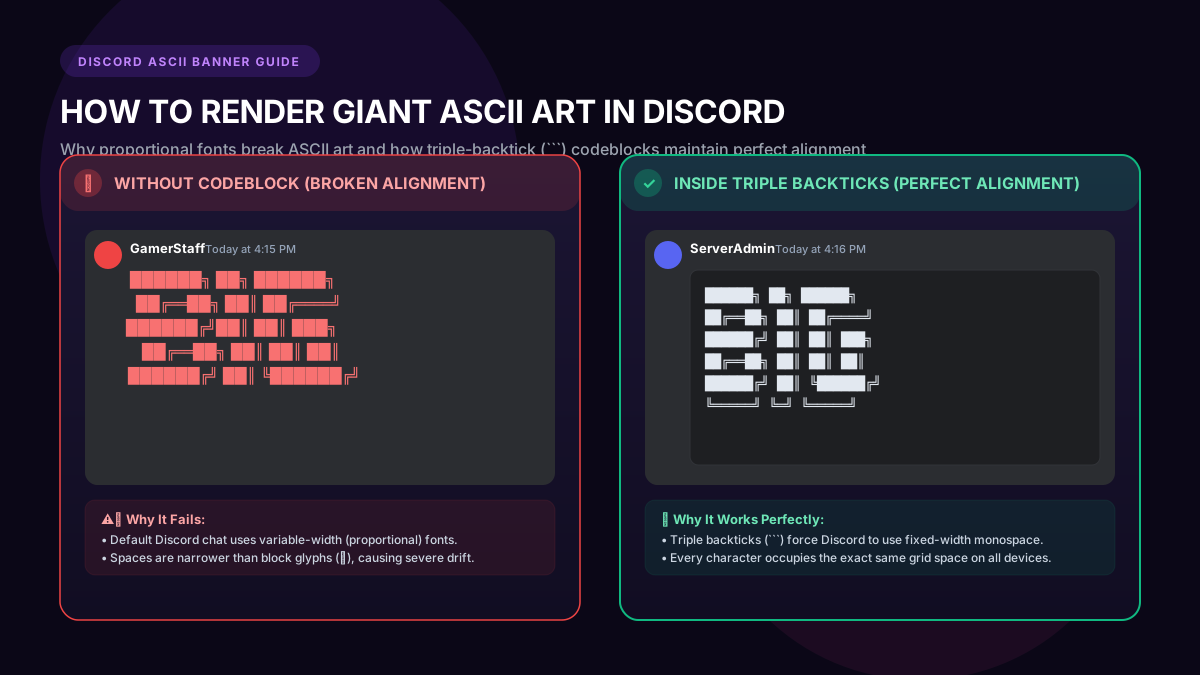
However, if you paste raw ASCII block art directly into Discord chat, disaster strikes: on mobile devices and narrow windows, the letters crumble into a jagged, incomprehensible mess. Why? Because default Discord chat uses a proportional font where spaces ( ) are significantly narrower than full block characters (█).
The permanent solution is wrapping your art inside triple backticks (```) to trigger a Discord Monospace Code Block. Code blocks enforce a fixed character grid where every single glyph and space shares the exact same pixel width:
```
██████╗ ██╗██████╗     ████████╗███████╗██╗  ██╗████████╗
██╔══██╗██║██╔════╝     ╚══██╔══╝██╔════╝╚██╗██╔╝╚══██╔══╝
██████╔╝██║██║  ███╗       ██║   █████╗   ╚███╔╝    ██║
██╔══██╗██║██║   ██║       ██║   ██╔══╝   ██╔██╗    ██║
██████╔╝██║╚██████╔╝       ██║   ███████╗██╔╝ ██╗   ██║
╚═════╝ ╚═╝ ╚═════╝        ╚═╝   ╚══════╝╚═╝  ╚═╝   ╚═╝
```Did you know Discord code blocks support syntax highlighting colors? By typing ```yaml, ```diff, or ```ini immediately after the first three backticks, Discord highlights text in green (+), red (-), yellow, or cyan! Check out our guide on huge block letters for gaming clans for syntax highlighting color templates.
6. The Limits of Markdown: Why # Fails in Channel Names, Roles & Nicknames
While `#` Markdown headers are fantastic inside chat channels, server administrators quickly hit an aggravating limitation: Discord Markdown only works in chat messages!
If you attempt to type # Announcement into a Discord voice channel name, a server category title, an assigned role name, or your personal user profile nickname, Discord’s validation parser will either strip the hashtag entirely or display the raw hashtag symbol literally without applying any styling.
Furthermore, Discord enforces strict character sanitization on text channel slugs, automatically converting uppercase letters to lowercase and replacing spaces with hyphens (e.g., turning "Rules and Info" into rules-and-info).
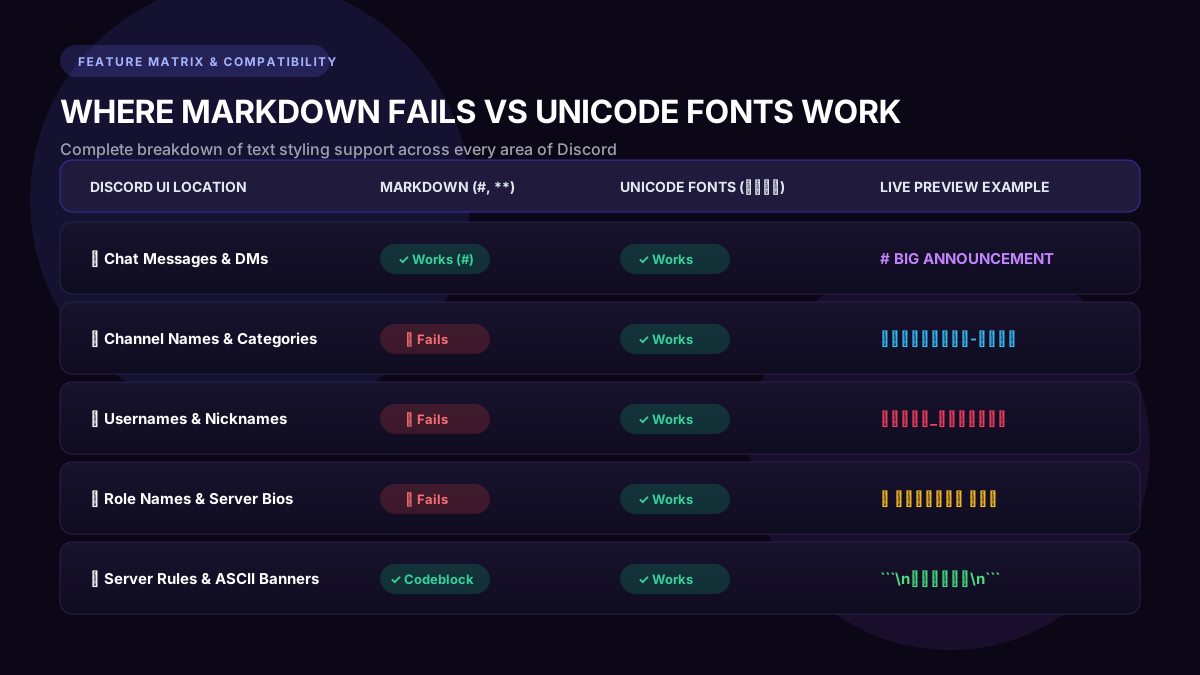
- Voice Channel Names: Markdown headers fail. Raw
#is displayed as a symbol. - Server Category Headers: Markdown headers fail. Discord ignores `#` syntax.
- Server Roles: Markdown headers fail. Roles cannot render markdown tags.
- Member Nicknames & Display Names: Markdown headers fail. Typing `# Name` displays literal hashtags.
7. Unicode Mathematical Fonts: The Secret to Big Bold Channel Names & Profiles
How do the world’s top Discord partnered servers create immaculate, aesthetic channel bars like 📢・𝗮𝗻𝗻𝗼𝘂𝗻𝗰𝗲𝗺𝗲𝗻𝘁𝘀, 💬・𝗴𝗲𝗻𝗲𝗿𝗮𝗹-𝗰𝗵𝗮𝘁, and 👑・𝕬𝖉𝖒𝖎𝖓-𝕷𝖔𝖚𝖓𝖌𝖊? How do esports professionals make their names look thick and prominent in voice channels?
The secret is Unicode Mathematical Alphanumeric Characters defined by the Unicode Standard Code Charts. Unicode is an international computing standard containing over 150,000 characters. Rather than changing the font style via CSS or Markdown, Unicode allocates dedicated character points for stylized letters—including Mathematical Bold Sans (𝗕𝗼𝗹𝗱), Double-Struck (𝔹𝕠𝕝𝕕), Fullwidth (BIG), and Gothic Fraktur (𝕭𝖔𝖑𝖉).
Because Discord treats Unicode characters as plain text glyphs rather than markup code, these letters bypass Discord's markdown restrictions completely. You can copy them from our Big Text Generator and paste them directly into:
- Server Channel Names: Transform bland channel lists into sleek, branded categories (e.g.
📌・𝗿𝘂𝗹𝗲𝘀-𝗮𝗻𝗱-𝗶𝗻𝗳𝗼). - Global Display Names & Server Nicknames: For an in-depth step-by-step walkthrough on styling your gaming profile, read our comprehensive guide on how to make text big on Discord profile username and nickname.
- Discord Server Roles: Give server moderators, VIP patrons, and tournament MVPs bold, glowing role names that stand out in the right-side member list.
- Server About Me Bios & Status Messages: Add aesthetic bold headers and stylized bullet points to your Discord profile card.
Modern iPhones, iPads, Windows 11, and Android 10+ render virtually all Unicode mathematical alphanumeric characters flawlessly. If you have community members on legacy Android devices experiencing blank boxes, check out our guide on why fonts change into boxes on older Android phones.
8. Complete Master Comparison: All 6 Ways to Make Big Text on Discord
To help you select the exact right method for your specific Discord use case, consult this comprehensive technical comparison:
| Styling Method | Example Syntax | Font Size / Footprint | Where It Works | Best Use Case |
|---|---|---|---|---|
| Header 1 (#) | # Announcement | ~32px Bold | Chat messages & forum posts only | Breaking news, main event headers |
| Header 2 (##) | ## Schedule | ~24px Bold | Chat messages & forum posts only | Section breaks, rule book topics |
| Header 3 (###) | ### Rules | ~18px Semi-Bold | Chat messages & forum posts only | Subheadings, minor notes, steps |
| Subtext (-#) | -# Updated 2026 | ~12px Muted Gray | Chat messages & forum posts only | Timestamps, disclaimers, signatures |
| ASCII Block Art | ``` ████ ``` | Multi-line massive banner | Chat code blocks only | Server welcome banners, rule headers |
| Unicode Bold Sans | 𝗕𝗜𝗚 𝗧𝗘𝗅𝗧 | Standard height, 2x weight | Everywhere (channels, names, roles) | Channel names, usernames, VIP roles |
| Fullwidth Aesthetic | BIG TEXT | 2x horizontal letter width | Everywhere (channels, bios, chat) | Aesthetic categories, vaporwave servers |
9. Troubleshooting: Top 5 Discord Formatting Errors & Quick Fixes
If your Discord text is not rendering as expected, check these five common troubleshooting scenarios:
- Problem 1: Typing "#" Does Not Make Text Big: Ensure there is an empty space between `#` and your first letter (e.g.,
# Big Text, not#BigText). Additionally, ensure the `#` is at the absolute start of the line—not preceded by a space, tab, or quote marker. - Problem 2: ASCII Art Appears Crooked or Jagged on Mobile: Proportional mobile fonts distort space characters. Always enclose multi-line ASCII banners inside triple backticks (
```) to lock Discord into monospace font rendering. - Problem 3: Discord Channel Name Strips Formatting: Discord channel slugs do not support Markdown. Use Unicode bold letters generated via Big Text Generator instead of typing `#` or `**`.
- Problem 4: Text Overflowing Screen Width on Phones: Discord mobile displays ~30 to 36 monospace characters per line in portrait mode before wrapping. If your ASCII banner is wider than 35 characters, it will wrap onto the next line and look garbled. Keep banner widths under 32 characters for 100% mobile perfection.
- Problem 5: Backticks Showing Up Literally: Make sure you are using backticks (
`located under the Esc key on US keyboards) and not single quote apostrophes (').
Want to apply big bold formatting to your other social apps? Explore our sister guides on how to write big bold text in Instagram bio and sending large text messages on WhatsApp.
Try Big Text Generator Live
Test and copy large Unicode fonts and ASCII block banners instantly for your projects.
Häufig Gestellte Fragen
Why is the # symbol not making my text big in Discord?
The most common reason is omitting the space after the hashtag. You must type "# Text" with a space, not "#Text". Also, ensure the hashtag is the very first character on the line without any preceding spaces or bullet points.
Can I make Discord text both big and colored?
Native Markdown headers (#) cannot be directly colorized with hex codes. However, inside triple-backtick code blocks (```), you can use syntax highlighting languages like ```diff (+ for green, - for red), ```yaml (blue and orange), or ```ini (cyan and dark blue) to colorize your text banners.
How do I make text big in Discord server channel names?
Discord native markdown headers (#) are disabled in channel names. To get big bold text in channel titles, open Big Text Generator, type your channel title, copy a Unicode Mathematical Bold style (like 𝗕𝗼𝗹𝗱 𝗦𝗮𝗻𝘀), and paste it directly into your channel name settings.
Does big text work on Discord iOS and Android mobile apps?
Yes! Native Discord Markdown headers (#, ##, ###), subtext (-#), and Unicode styled fonts render seamlessly across the Discord iOS app, Android app, desktop client, and web browser.
What is the character limit for Discord messages with big text?
Standard Discord users have a 2,000-character limit per message, while Discord Nitro subscribers enjoy a 4,000-character limit. Markdown header symbols count toward this character total.
How do I keep ASCII banners from getting messed up on phones?
Always enclose the ASCII banner in triple backticks (```) to activate monospace rendering, and restrict the width of the ASCII banner to no more than 30–35 characters wide so it does not line-wrap on narrow phone screens.