1. Introduction: The Enduring Magic of Character Art in a 4K World
In an era dominated by retina displays, 4K OLED screens, real-time 3D ray tracing, and photorealistic AI image generation, an unexpected computing phenomenon continues to thrive: ASCII Art.
Whenever you spin up a modern developer build tool like Astro, Vite, or Next.js in your terminal, the console greets you with a brilliant ASCII logo. Whenever you browse the top open-source repositories on GitHub, the project READMEs proudly feature stylized block banners. In high-traffic Discord gaming servers and Twitch live streams, communities paste multi-line text art to celebrate tournament victories and streamer raids.
ASCII art is a graphic design technique that uses printable characters from standardized computer character sets to compose pictures, typography, diagrams, and decorative banners. Because it exists purely as plain text, ASCII art requires zero image bandwidth, bypasses image upload blockers, and renders inside raw monospace terminal environments.
Whether you are an engineer looking to brand your terminal CLI, a gamer wanting an epic Steam profile banner, or a digital history enthusiast curious about how computer graphics were born, this definitive 2026 guide covers the complete history, technical mechanics, and modern tools behind text art.
Need to create instant ASCII banners right now? Use our free BIG Text Generator to type any word and immediately generate 50+ classic FIGlet and modern solid Unicode block styles with 1-click copy and PNG export.
2. The Origins of ASCII: 1960s Teletypes, Baudot Code & Overstriking
To understand ASCII art, we must journey back to the dawn of digital telecommunications. Before electronic video display terminals (CRTs) existed, human interaction with computers occurred through mechanical teleprinters—such as the iconic Teletype Model 33 ASR—which printed typed text onto physical rolls of paper.
In 1963, the American Standards Association (ASA, later known as ANSI) published the first official version of ASCII (American Standard Code for Information Interchange), codified for networked systems in RFC 20. ASCII established a universal 7-bit character encoding system consisting of exactly 128 characters (numerical values 0 to 127). This included 95 printable characters (the Latin alphabet A–Z in uppercase and lowercase, digits 0–9, and punctuation symbols) and 33 non-printing control codes.
Early computer operators and teletype enthusiasts realized that by carefully arranging characters across a paper line, they could simulate continuous drawings. Furthermore, mechanical teleprinters supported an ingenious technique called "overstriking": by sending a carriage return without a line feed, the printer head would print a second character directly on top of the first. By overstriking dense letters like M, W, and #, operators created deep grayscale shadows and tonal gradients long before computer pixels existed.
     /\_/\
    ( o.o )
     > ^ <
Classic 7-Bit ASCII Cat3. The 1980s BBS Boom, ANSI Art & The Underground Demoscene
In the 1980s and early 1990s, personal computing exploded through dial-up Bulletin Board Systems (BBS). Before the public World Wide Web existed, computer enthusiasts used telephone modems to dial directly into host servers to download files, read forums, and play text-based door games like TradeWars 2002.
With the introduction of the IBM PC in 1981 came Code Page 437 (DOS Latin US). This 8-bit extension doubled the available characters from 128 to 256, introducing dedicated box-drawing symbols (╔, ═, ╗, ║) and three distinct shading blocks (░ light shade, ▒ medium shade, ▓ dark shade). Combined with ANSI escape codes that controlled screen color, artists could create vibrant 16-color fullscreen illustrations.
This sparked the birth of the ANSI and ASCII Demoscene. Organized underground art groups—such as ACID Productions, iCE Advertisements, and Mimic—competed fiercely to design breathtaking BBS login screens and .NFO file art for software releases by pirate groups like Razor 1911 and Fairlight. Software like TheDraw became the Photoshop of the text art world, enabling artists to paint directly onto character grids with their keyboards.

4. The 1991 FIGlet Revolution: How Automated Banner Fonts Conquered Computing
While manual ASCII art required artistic talent, programmers frequently needed an automated way to generate clean, readable, giant text banners for software titles, system logs, and email signatures.
In 1991, programmers Glenn Chappell and Ian Chai (with key contributions from Frank Higgins) released FIGlet (Frank, Ian & Glenn’s Letters), preserved today in the Official FIGlet Project Archive. FIGlet introduced an algorithm that mapped standard keyboard inputs onto multi-line character matrices stored in lightweight .flf (FIGlet Font) files.
Instead of hand-drawing every letter, a user could type a phrase into the terminal command line, and FIGlet would instantly render monumental typography. Iconic FIGlet fonts became embedded into the very DNA of computing culture:
- Standard: The classic, balanced outline font featuring diagonal strokes and box borders.
- Slant: An aggressive, forward-leaning italic aesthetic that became the standard in hacker and gaming circles.
- Shadow: A three-dimensional block font that uses drop shadows to create a faux-extruded visual depth.
- Banner: A towering, high-contrast block font designed to span entire terminal widths.
- Small & Mini: Compact 3-line tall fonts optimized for narrow columns and mobile screens.
   ____  __________________   _  _______
  / __ )/  _/ ____/_  __/ /  | |/ /_  __/
 / __  |/ // / __  / / / /   |   / / /
/ /_/ // // /_/ / / / / /___/   | / /
/_____/___/\____/ /_/ /_____/_/|_|/_/ 5. The Technical Mechanics: Fixed Monospace Grids vs Variable Fonts
Why does ASCII art require monospace typography, and why does it look ruined when pasted into Microsoft Word, WhatsApp, or standard web pages? The answer lies in the fundamental geometry of typography.
Standard everyday fonts (like Arial, Helvetica, Inter, and Times New Roman) are proportional fonts. In a proportional font, every glyph is given a custom horizontal width tailored to its shape. For instance, the letter "W" is broad, while the lowercase letter "i" and the space character " " are ultra-thin. If an artist uses 5 spaces to align a roof over an ASCII house, those 5 spaces shrink down into a tiny sliver in a proportional font, completely destroying the geometric alignment.
ASCII art was engineered exclusively for monospace (fixed-width) fonts (such as Courier, Consolas, Menlo, and Fira Code). In a monospace font, every single character—from a full block █ to an empty space —occupies an identical rectangular bounding box. Furthermore, most monospace fonts feature an approximate 2:1 vertical-to-horizontal aspect ratio (each character is roughly twice as tall as it is wide). Seasoned ASCII artists deliberately utilize this aspect ratio to calculate geometric slopes, diagonals, and circles.
Whenever you share multi-line ASCII art on platforms like Discord, Reddit, or GitHub, always wrap it inside triple backticks ``` to activate a monospace code block. Check our complete guide on how to make big text on Discord for step-by-step code block instructions.
6. Character Architecture: 7-Bit ASCII vs Extended ANSI vs Modern Unicode
A frequent point of confusion among modern web users is the difference between classic ASCII art and modern Unicode block typography. Understanding the character set evolution clarifies why modern block text looks so much cleaner and more solid:
Under the latest Unicode Standard Block Elements (U+2580–U+259F) Specification, modern operating systems include full-width, half-width, and quarter-width geometric tiles:

- Full Block (
█U+2588): A completely solid rectangle spanning the entire character cell without any internal white space margins. - Half Blocks (
▀U+2580,▄U+2584): Upper and lower half-blocks that allow artists to double the vertical resolution of text art. - Shade Blocks (
░U+2591,▒U+2592,▓U+2593): Stippled geometric gradients simulating 25%, 50%, and 75% visual density for smooth shading. - Quadrant Blocks (
▖,▗,▘,▝): Granular block fragments enabling smooth diagonal corners and curves.
7. Modern Resurgence: Where ASCII Art Thrives in 2026
Rather than fading into obsolescence, ASCII art in 2026 is experiencing an unprecedented cultural renaissance across four major digital sectors:
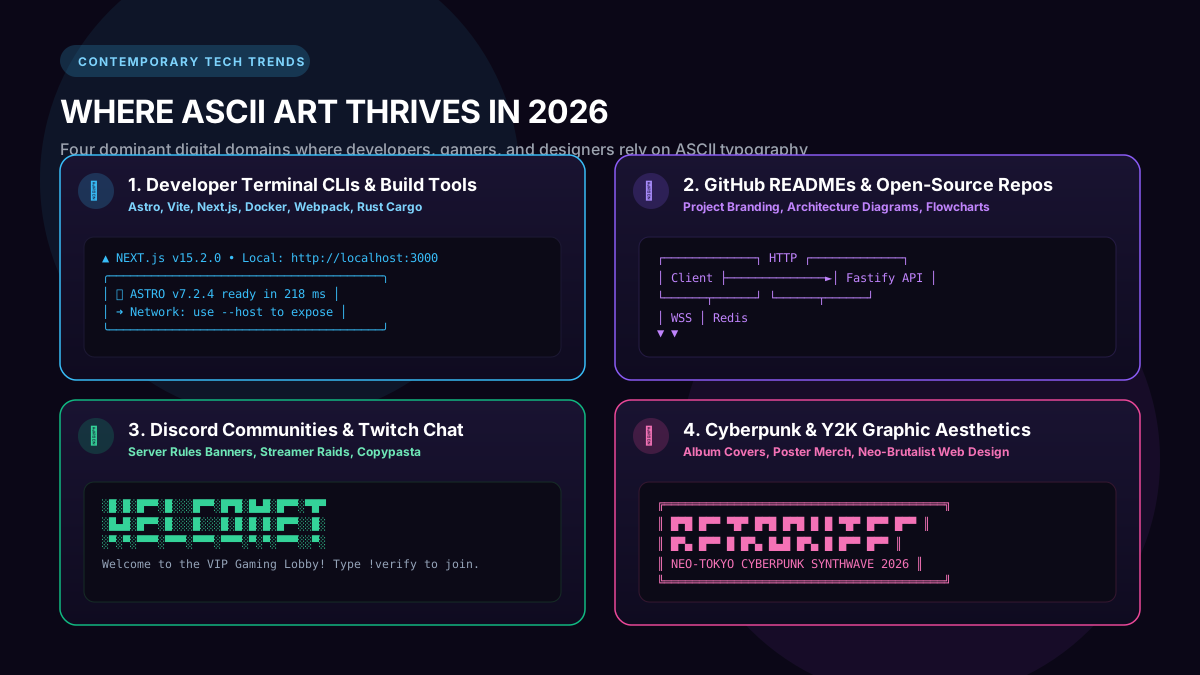
- 1. Developer CLI Tools & Terminal Frameworks: Modern web development tools—including Astro, Vite, Next.js, Bun, Docker, and Supabase—display iconic ASCII logotypes upon server initialization. It delivers instantaneous visual confirmation that the environment is healthy while establishing strong developer branding.
- 2. GitHub Open-Source Repositories: Open-source documentation must be immediately captivating. Top developers embed bold ASCII banners and ASCII architecture flowcharts directly into their
README.mdfiles, ensuring the graphics render flawlessly in dark and light modes without external image hosting. - 3. Gaming Communities & Esports Profiles: Gamers use ASCII text banners to decorate Steam custom profile showcases, clan recruiting boards, and Discord server rules. For an analysis of how competitive squads brand their tags, read our ranking of the best website for huge block letters in Steam and Free Fire.
- 4. Cyberpunk & Neo-Brutalist Graphic Design: Contemporary digital artists and indie music labels frequently feature high-contrast ASCII typography on album cover art, physical merch, and landing page designs to evoke a retro-futuristic, high-tech aesthetic.
8. The 5 Primary Genres of Text Art: A Comparative Breakdown
Over the past six decades, text artists have developed five recognized artistic disciplines, each with distinct rules, character sets, and optimal use cases:
| Genre Name | Primary Characters Used | Visual Style & Impact | Ideal Platforms |
|---|---|---|---|
| Line / Punctuation Art | / \ | _ - ( ) * | Delicate line drawings, classic retro feel | Email signatures, programming source code comments |
| Solid Block Typography | █ ▓ ▒ ░ ▀ ▄ | Massive, heavy, poster-like billboard impact | Steam custom info boxes, Discord server rules |
| ANSI Color Art | CP437 blocks + ANSI escapes | Full-color 16-color pixel illustrations | Telnet BBS boards, retro computing demoparties |
| FIGlet Slant & Shadow | / _ \ | [ ] | 3D extruded hacker aesthetic typography | Terminal CLI banners, GitHub repo headers |
| Japanese Kaomoji & Micro Art | ( ͡° ͜ʖ ͡°) ¯\_(ツ)_/¯ | Expressive single-line emotion glyphs | Social media bios, chat reactions, gaming names |
9. How to Generate, Copy & Download High-Resolution ASCII Art in Seconds
Historically, creating ASCII art required either painstaking manual typing on a monospace grid or downloading legacy command-line tools written in C. Today, BIG Text Generator brings modern browser engineering to text art:
- Step 1: Input Your Text: Simply visit the homepage and type your word or phrase into the live input box. The tool renders your text across dozens of classic and modern font styles simultaneously in real-time.
- Step 2: Choose Your Aesthetic: Scroll through the curated styles—from classic FIGlet Slant, Standard, and Shadow to modern High-Density Solid Block (
███) and Box Drawing (╔═╗). - Step 3: 1-Click Clipboard Copy: Click the "Copy" button on any card to copy the perfectly aligned monospace characters directly to your clipboard, ready to paste into Discord, Steam, GitHub, or terminal scripts.
- Step 4: High-Resolution Transparent PNG Download: Need to import your ASCII banner into Photoshop, Canva, Figma, or a video thumbnail? Every block art style includes an instant "Download PNG" feature that renders the typography at high pixel density with a transparent background.
Curious why certain Unicode symbols render differently on older phones? Read our in-depth technical analysis on why fonts change into boxes on older Android phones to ensure 100% cross-platform readability.
Try Big Text Generator Live
Test and copy large Unicode fonts and ASCII block banners instantly for your projects.
Frequently Asked Questions
Why do ASCII art banners look jumbled or distorted on mobile phones?
ASCII banners rely strictly on fixed-width monospace fonts where spaces and letters have identical widths. On mobile apps using proportional fonts, spaces are significantly narrower than characters, causing vertical columns to shift sideways. Wrapping the text in triple-backtick code blocks (```) or markdown indentations fixes the alignment immediately.
Is ASCII art copyright-free and safe for commercial use?
Standard ASCII and Unicode characters themselves are universal public domain computing standards and cannot be copyrighted. You are completely free to use generated ASCII typography for commercial software, merchandise, game titles, and branding.
What is the difference between ASCII art and ANSI art?
ASCII art uses the 7-bit standard (128 characters) without color codes. ANSI art was developed for IBM PC DOS and BBS systems, utilizing Code Page 437 (256 characters with box drawing and shading blocks) combined with ANSI escape sequences to display 16 distinct foreground and background colors.
Can I export ASCII text as an image for graphic design projects?
Yes! BIG Text Generator includes a built-in 1-click "Download PNG" button on every block art style, exporting crisp, high-resolution transparent PNG images ready for video editing, social media thumbnails, and merchandise printing.
How many characters wide should an ASCII banner be for Discord and Steam?
For Discord mobile devices in portrait mode, keep banner widths under 32–36 characters to prevent horizontal wrapping. For desktop Discord and Steam Custom Info Boxes, widths up to 50–60 characters display comfortably.
Who invented FIGlet and what does the name stand for?
FIGlet was created in 1991 by Glenn Chappell and Ian Chai, inspired by Frank Higgins. The name stands for "Frank, Ian & Glenn’s Letters". It automated the generation of large multi-line text banners and remains a standard Unix utility.
Can ASCII block art trigger anti-cheat bans in games like Steam or Free Fire?
No. ASCII and Unicode characters are standard text inputs parsed natively by operating systems and game chat engines. They do not alter game memory or files and are 100% VAC, Garena, and anti-cheat compliant.