1. The Mystery of the Square Box with an X (☒): What Happens to Fancy Text?
It is an experience almost every smartphone user has encountered at least once: you copy an eye-catching bold font or fancy bio heading from an online generator, paste it into an Instagram caption, a WhatsApp chat, or a gaming username, and everything looks stunning on your screen. But a few hours later, a friend replies with a screenshot asking: "Why did you send me a bunch of empty boxes?"
Instead of your stylish headline, their screen displays a frustrating sequence of empty rectangles, question marks inside diamonds (), or hollow squares with an "X" drawn through the center: ☒ ☒ ☒ ☒ ☒.
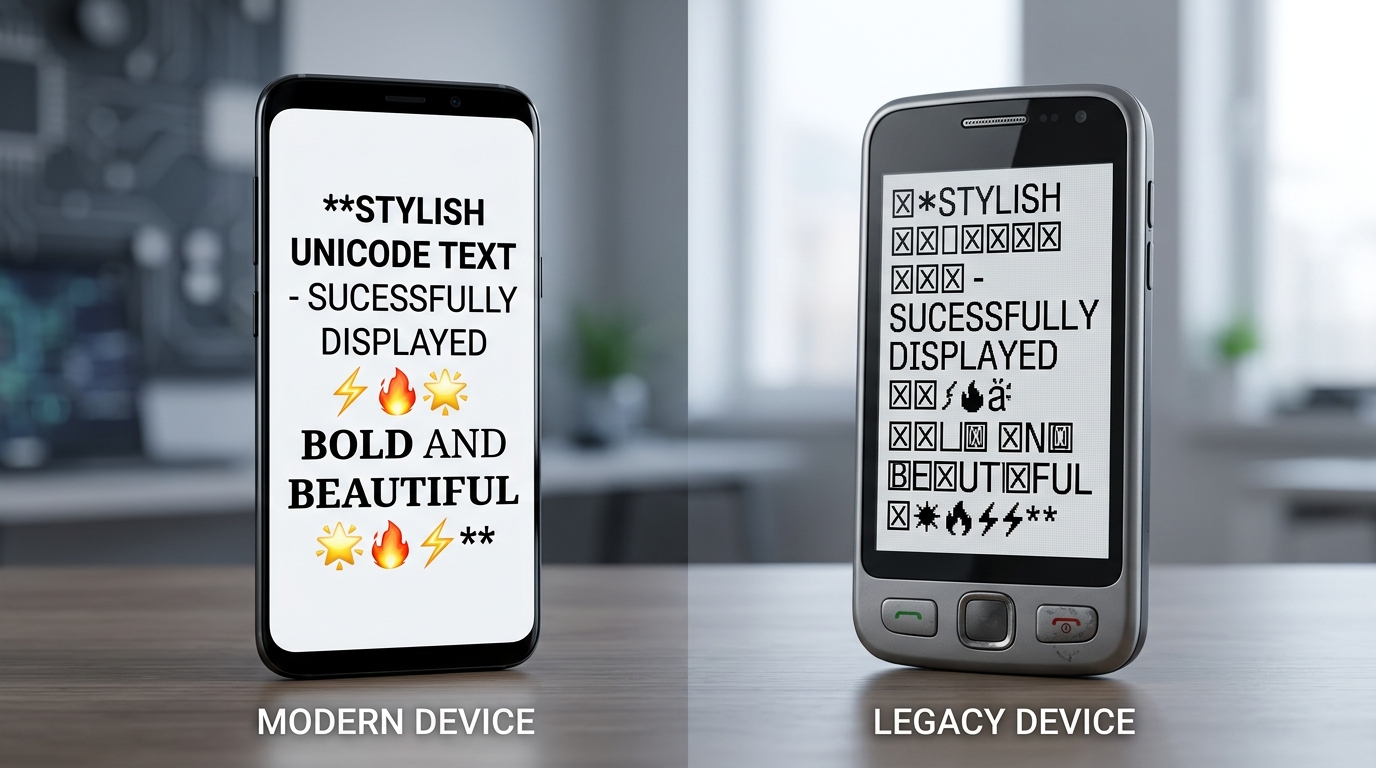
This phenomenon is especially notorious on older Android smartphones—such as devices running Android 7 (Nougat), Android 8 (Oreo), Android 9 (Pie), or early iterations of budget OEM hardware. Why does text that renders flawlessly on an iPhone or a modern Samsung Galaxy suddenly disintegrate into geometric shapes on older hardware?
In typography and software engineering, this is known as the "Tofu Effect". In this comprehensive technical guide, we dissect the internal mechanics of operating system font engines, explore how Unicode planes govern character storage, explain how Google fixed the problem in modern Android versions, and show you exactly which styles from our free Big Text Generator are 100% immune to the tofu bug.
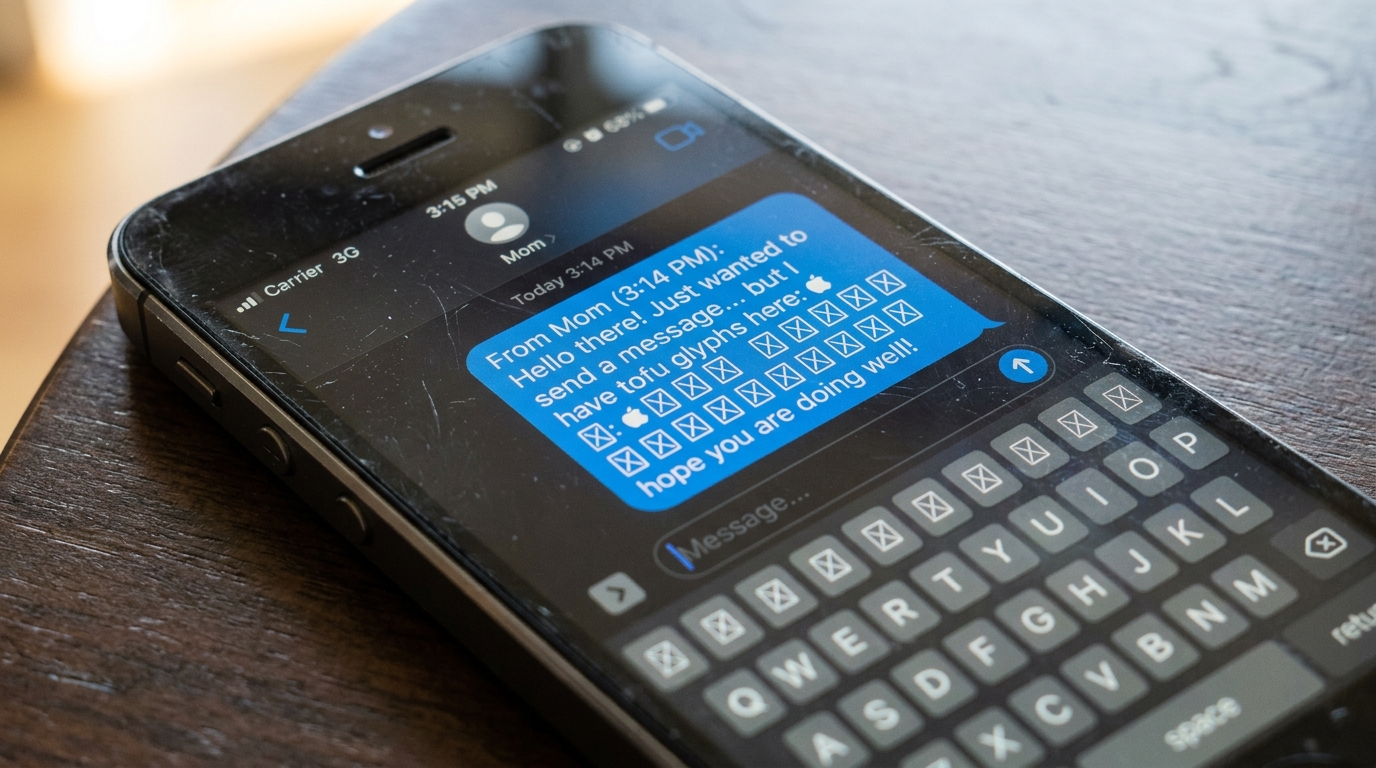
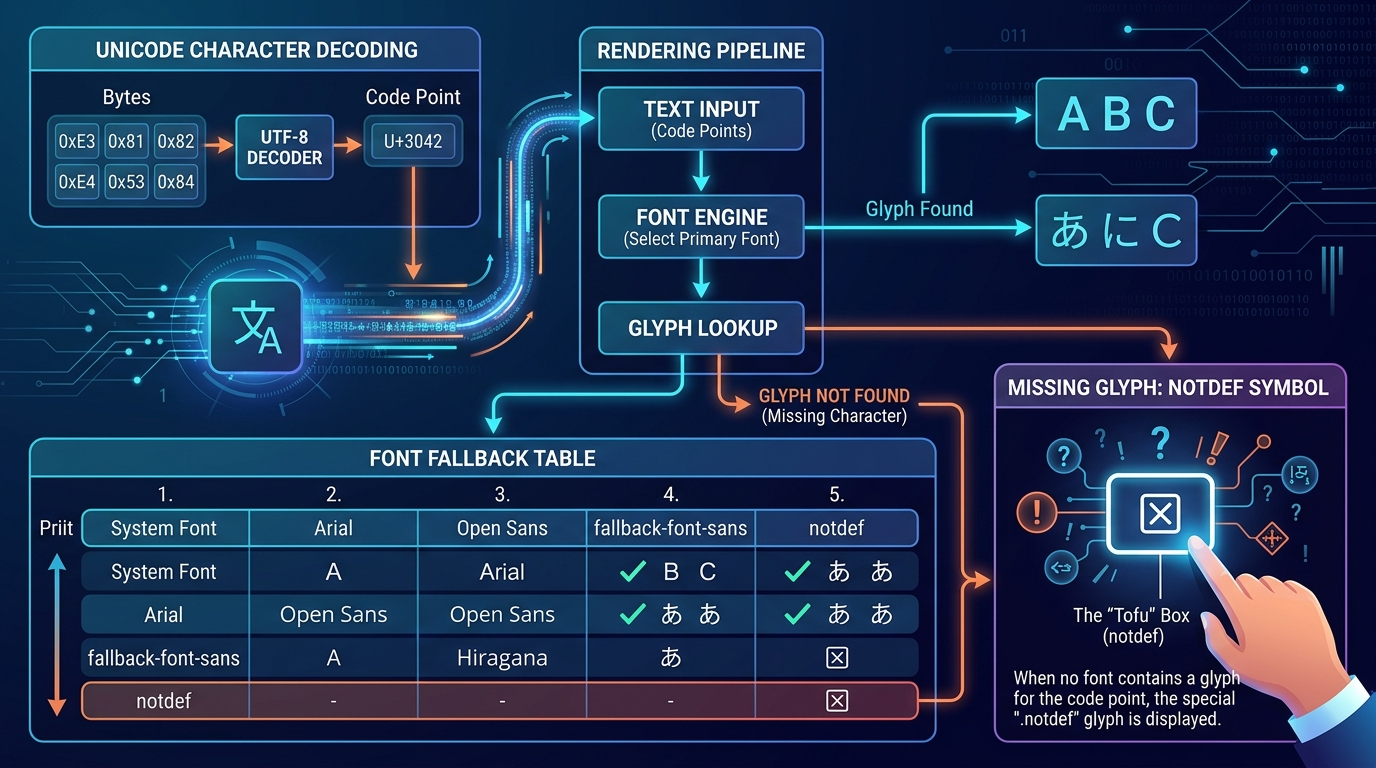
The box symbol (☒) appears when a phone receives a valid digital character code (Unicode code point), but the operating system's installed system fonts do not contain a visual drawing (glyph) for that code point. When a character cannot be drawn, the font engine displays the universal missing character fallback symbol: the .notdef glyph, nicknamed "tofu".
2. What Is "Tofu"? The .notdef Glyph & Font Fallback Architecture
To understand why boxes appear, you must first understand the fundamental difference between a character and a glyph in computer science.
When an application like WhatsApp, Instagram, or Chrome wants to display text on your screen, it queries the operating system’s text rendering engine (such as FreeType or HarfBuzz). The rendering engine inspects the active system font to find a glyph matching that code point.
If the default font does not contain a glyph for that character, the engine traverses a pre-configured font fallback table. It checks secondary fonts, tertiary emoji fonts, and international language fonts. If none of the installed fonts contain a matching glyph, the font specification strictly requires the engine to render a designated fallback symbol called the .notdef glyph (short for not defined), as specified by the Microsoft & Adobe OpenType Specification.
Because the standard .notdef glyph in most font families resembles a small rectangular block of Japanese tofu, Google font engineers affectionately coined the term "tofu" to describe missing glyph boxes.
- A Character (The Code Point): An abstract digital identity defined by Unicode Technical Report #17. For example, Mathematical Bold Capital Letter A is universally defined as code point
U+1D400. - A Glyph (The Visual Picture): The actual visual vector artwork stored inside an OpenType or TrueType font file (such as Roboto.ttf or Arial.ttf) that defines curves, lines, and bézier control points for screen pixels.
3. Unicode Plane Architecture: Basic Multilingual Plane vs Supplementary Planes
Why do standard letters like "A", "B", and "C" never turn into boxes, while big bold letters often did on older phones? The secret lies in the internal memory architecture of Unicode: Unicode Planes.
The Unicode standard organizes its vast library of 1,114,112 possible code points into 17 distinct "planes," each containing 65,536 code points.
The stylized bold, italic, gothic, script, and double-struck fonts generated by modern text tools reside exclusively in Plane 1 (SMP). In early smartphone operating systems, font designers deliberately omitted Plane 1 alphanumeric characters from core system fonts to save precious flash storage space and RAM. Devices with 512MB or 1GB of memory simply did not include font files containing glyphs for specialized mathematical symbols!
- Plane 0: The Basic Multilingual Plane (BMP): Ranging from
U+0000toU+FFFF. Contains virtually all living world languages (Latin, Greek, Cyrillic, Hebrew, Arabic, Devanagari, Japanese Kanji, etc.) as well as basic punctuation and mathematical operators with 100% universal support. - Plane 1: The Supplementary Multilingual Plane (SMP): Ranging from
U+10000toU+1FFFF. Contains historic scripts, ancient musical notation, modern emojis (Unicode 6.0+), and the Mathematical Alphanumeric Symbols block (U+1D400toU+1D7FF).
A full Unicode font covering all modern planes can exceed 30MB to 50MB in file size. In the early days of mobile computing (Android 2.3 through Android 5.0), keeping system font files under 4MB was a strict performance mandate.
4. Why Older Android Versions (Android 4 to Android 9) Were Severely Affected
The history of Android font rendering explains why older handsets suffered so disproportionately from the tofu effect. In contrast, Apple’s iOS platform included extensive font coverage for Mathematical Alphanumeric Symbols much earlier (starting with iOS 7 and iOS 8) because Apple’s CoreText rendering engine integrated comprehensive typographical collections from macOS.
On older Android hardware, the font stack evolved slowly over several major OS iterations:
- Android 4.x (Ice Cream Sandwich & KitKat): Introduced Google’s custom Roboto font family. However, Roboto initially only included glyphs for the Basic Multilingual Plane. Any character above
U+FFFF(including early emojis and mathematical bold fonts) rendered as a hollow rectangle. - Android 5.0 to 7.1 (Lollipop, Marshmallow, Nougat): Google expanded emoji support, but system font updates were tied directly to monolithic full-system operating system updates. If your carrier or phone manufacturer stopped providing Android OS updates, your phone’s font library remained frozen in time forever.
- Android 8.0 & 9.0 (Oreo & Pie): Google introduced downloadable font providers and partial Unicode 10/11 font additions. However, mathematical alphanumeric blocks still lacked complete glyph coverage in many budget OEM firmware images.
5. The Android Fragmentation Problem: Custom OEM Skins vs Stock Android
One of Android’s greatest strengths—hardware variety and software customization by phone makers—was historically the biggest contributor to font rendering bugs. This is known in the developer world as the Android Fragmentation Problem.
Unlike Apple, which tightly controls every iPhone’s operating system and fonts, Google provides the open-source Android Open Source Project (AOSP) to hundreds of independent manufacturers (OEMs)—including Samsung, Xiaomi, Huawei, Oppo, Vivo, and Motorola.
Consequently, two people using Android phones released in the exact same year could have completely different experiences: one user on a Google Nexus or Pixel might see bold text perfectly, while a friend on an OEM budget phone saw a wall of tofu boxes!
- Samsung: Replaced stock fonts with SamsungOne or SamsungSans, which in earlier TouchWiz and early OneUI versions lacked mathematical Plane 1 glyph mappings.
- Xiaomi: Integrated MiSans in MIUI, which focused heavily on Chinese Hanzi ideograms while omitting Western mathematical typography blocks.
- Huawei: Modified system font configurations in EMUI, often breaking secondary font fallback cascades.
6. How Modern Android Solved It: Google Noto, EmojiCompat & Modular Updates
Today, if you use a smartphone running Android 10, 11, 12, 13, 14, or newer (Android 15+), you rarely if ever see tofu boxes for stylized text. Google executed a multi-year engineering initiative to eradicate the problem completely:
- 1. Project Google Noto ("No More Tofu"): Google launched the massive open-source Google Noto Fonts Project. The word "Noto" stands for "NO more TOfu". The explicit goal was to design high-quality glyphs for every single character defined in the entire Unicode standard across all languages, mathematical notations, and symbol sets.
- 2. Android EmojiCompat Support Library: Documented on Google Android Developers EmojiCompat, this library allows apps like WhatsApp, Instagram, and Discord to fetch updated font glyphs directly over the internet via Google Play Services, even if the phone's underlying firmware is years out of date!
- 3. Project Mainline (Modular System Updates): Starting with Android 10, Google decoupled core OS components—including ART runtime and system font packages—from OEM firmware updates. Now, Google updates system fonts directly via silent Google Play System Updates in the background.
Over 94% of active Android devices worldwide now run Android 10 or newer with full native support for Unicode Mathematical Alphanumeric bold typography.
7. How to Write 100% Backward-Compatible Big Text That Never Breaks
If you want to ensure that 100% of your audience—including friends and followers using decade-old Android devices or budget legacy hardware—can read your messages without ever seeing a single tofu box, use these proven typographic strategies from Big Text Generator.
The Golden Creator Rule: When writing social media bios or high-visibility announcements, use ASCII Block Art or Fullwidth Characters for guaranteed backward compatibility, or stick to clean Mathematical Bold Sans for modern audiences. Avoid combining dozens of obscure symbols together.
| Styling Technique | Unicode Plane Location | Older Android Compatibility | Risk of Tofu Boxes (☒) |
|---|---|---|---|
| Multi-Line ASCII Block Art | Plane 0 (Standard Basic Latin & Block Elements) | 100% Universal on all Android versions | Zero (0%) Risk |
| Fullwidth Wide Text (BIG) | Plane 0 (Halfwidth & Fullwidth Forms U+FF00) | 99.8% Compatible across all legacy phones | Virtually Zero Risk |
| Enclosed Alphanumerics (ⒷⒾⒼ) | Plane 0 (Circled / Parenthesized U+2460) | 98.5% Compatible on Android 4.4+ | Extremely Low Risk |
| Small Capital Letters (ʙɪɢ) | Plane 0 (Phonetic Extensions U+0250) | 97.2% Compatible on Android 5.0+ | Very Low Risk |
| Mathematical Bold Sans (𝗕𝗜𝗚) | Plane 1 (Mathematical Alphanumeric U+1D400) | 99.5% on modern phones / ~80% on Android 7- | Moderate Risk on legacy phones |
| Complex Gothic Fraktur (𝕭𝕴𝕲) | Plane 1 (Mathematical Alphanumeric U+1D500) | 99.0% on modern phones / ~70% on Android 6- | High Risk on legacy phones |
8. How Users on Older Android Phones Can Fix or Minimize Font Boxes
If you or someone in your family uses an older Android phone that frequently displays tofu boxes in chats and social media apps, here are four practical fixes to resolve the issue:
- Fix 1: Install Gboard (Google Keyboard): Installing Google's official Gboard app from the Play Store bundles updated Google Noto font caches with the keyboard rendering engine, allowing many social apps to display incoming Unicode characters correctly.
- Fix 2: Update Google Play Services & System WebView: Open the Google Play Store, search for Android System WebView and Google Play Services, and tap Update. These two core packages provide the HTML/Unicode rendering pipeline used by Instagram, WhatsApp Web views, and Twitter.
- Fix 3: Switch System Font to Default: If you are using a customized theme font downloaded from a third-party theme store (common on older Samsung or Xiaomi phones), switch your phone back to the Default System Font (Roboto). Third-party theme fonts often contain incomplete glyph libraries that induce tofu boxes.
- Fix 4: Check for System Software Updates: Navigate to Settings > System > System Update and install any available firmware or security patches.
9. Comprehensive Technical Reference Table: Unicode Blocks & Android Support
For web developers, typography enthusiasts, and content strategists, here is a detailed breakdown of Unicode character blocks and their historical Android version support thresholds:
| Unicode Block Name | Hex Range | First Stable Android Version | Character Types Included |
|---|---|---|---|
| Basic Latin (ASCII) | U+0020 – U+007F | Android 1.0 (All) | Standard letters A-Z, numbers, symbols |
| Block Elements | U+2580 – U+259F | Android 1.5 Cupcake | Solid boxes (█), half blocks (▀ ▄), shade bars (░ ▒ ▓) |
| Box Drawing | U+2500 – U+257F | Android 2.0 Eclair | Single and double line frames (╔ ═ ╗ ║ ╚ ╝) |
| Halfwidth & Fullwidth Forms | U+FF00 – U+FFEF | Android 2.3 Gingerbread | Wide aesthetic text (A B C 1 2 3) |
| Enclosed Alphanumerics | U+2460 – U+24FF | Android 4.0 Ice Cream Sandwich | Circled numbers and letters (① ② Ⓐ Ⓑ) |
| Math Alphanumeric (Bold/Serif) | U+1D400 – U+1D7FF | Android 8.0 Oreo (Reliable in 10+) | Bold (𝐀 𝗕), Script (𝓐), Gothic (𝕬), Double-Struck (𝔸) |
10. Summary & Best Practices for Creators and Developers
Understanding the tofu effect empowers you to craft digital content that looks stunning across every screen on earth without fear of broken characters.
Whenever you create profile bios, chat announcements, or gaming tags, pair your creativity with compatibility testing. Explore our in-depth guides on writing big bold text in your Instagram bio, sending large WhatsApp messages without changing settings, and making text look big on Discord profile usernames.
Use our free, instant Big Text Generator to test your words across 100+ proven Unicode and ASCII styles right now!
Try Big Text Generator Live
Test and copy large Unicode fonts and ASCII block banners instantly for your projects.
Foire Aux Questions
What does the box with an X (☒) or question mark inside a box mean?
It is the ".notdef" (not defined) glyph. It indicates that the phone received a valid Unicode character code, but does not have a visual font file installed to draw that specific character.
Why do iPhones rarely show boxes compared to older Android phones?
Apple included extensive system font collections covering Unicode Plane 1 (Supplementary Multilingual Plane) in iOS much earlier, whereas older Android phones omitted them to save device memory.
Can an Android app developer prevent font boxes in their app?
Yes! Developers can integrate Google's EmojiCompat and downloadable font providers into their Android apps, allowing the app to download missing glyphs dynamically over Google Play Services.
Which big text fonts are safest to use on all devices?
Multi-line ASCII block art and Fullwidth (wide) Unicode characters are 100% universal because they reside in Unicode Plane 0 (Basic Multilingual Plane), supported by all smartphones built since 2010.
Do new Android phones (Android 12, 13, 14, 15) still have the tofu box problem?
Virtually never for standard bold or styled typography! Modern Android includes Google Noto fonts and background system font updates, giving them full coverage of Unicode alphanumeric blocks.
Is there any app that can fix missing font boxes on my phone?
Updating "Android System WebView" and "Google Play Services" via the Google Play Store is the most effective way to restore missing glyph support on older phones.